Clock Orbit: Your Minimal Desk Clock for a Stylish Digital Workspace
In an era where digital minimalism meets peak productivity, finding tools that enhance focus without overwhelming the senses is essential. As we spend increasing amounts of time in front of screens-whether for work, study, or relaxation-the tools we choose should contribute to a clean, calming environment. Clock Orbit enters this space as an elegantly designed desk clock app that offers just the right balance of functionality and simplicity.
Introduction
Minimalist digital apps are on the rise, with users craving distraction-free interfaces that let them focus on what truly matters. Clock Orbit answers this need by transforming your device into a refined timekeeping display that’s ideal for desks, nightstands, or focused study sessions. Its beauty lies in its elegant design, versatile features, and sheer usability-making it a perfect addition to any workspace or restful corner.

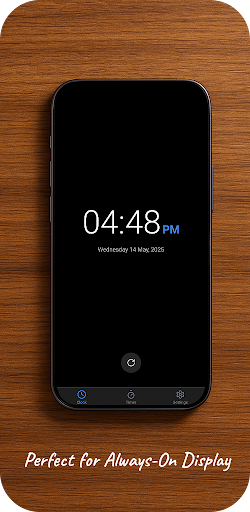
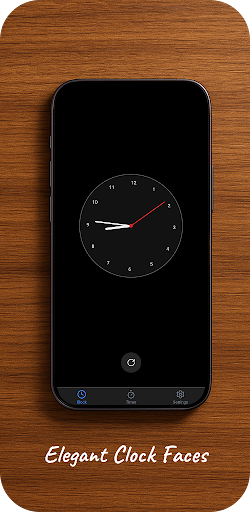
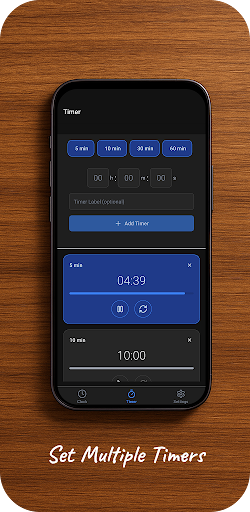
What is Clock Orbit?
Clock Orbit is a sleek, minimal desk clock application available on the Google Play Store, designed by The Dev Orbit. The app has been thoughtfully developed to serve as a visual anchor in digital environments, offering users a tranquil, aesthetically pleasing time display.
Targeted for everyone-from productivity enthusiasts to those who appreciate beautifully designed digital tools-Clock Orbit is lightweight, ad-free, and simple to use. It supports both light and dark themes and offers essential time formatting choices, ensuring it fits seamlessly into any user’s lifestyle or aesthetic preference.
Core Philosophy Behind Clock Orbit
The fundamental design ethos of Clock Orbit centers around minimalism, clarity, and functionality. It avoids clutter and unnecessary features, offering users only what they need to keep time effortlessly. This design philosophy not only promotes visual peace but also encourages users to stay focused and grounded throughout their day.
Inspired by modern UI trends and digital calmness, Clock Orbit brings a serene experience to users who want to enhance their digital spaces. Whether placed beside a monitor, on a nightstand, or used during focus sessions, the app’s quiet elegance and efficient interface stand out without screaming for attention.
Key Features of Clock Orbit
Minimal & Clean UI
Clock Orbit features a clutter-free display enhanced by smooth, modern typography. Every element on the screen has been purposefully placed to maintain balance and visual calm. This design reduces digital noise and helps users stay attentive without unnecessary distractions.
Light & Dark Themes
With light and dark themes-along with the ability to follow your device’s system setting-Clock Orbit offers visual flexibility for any time of day. The dark mode is ideal for night use, reducing eye strain, while light mode complements sunlit workspaces with clear, soft contrast.
12-hour / 24-hour Format Options
Clock Orbit allows users to choose between 12-hour and 24-hour formats based on personal or regional preferences. Additionally, you can toggle the display of seconds, offering more or less granularity based on your timekeeping needs.
Always-On Display Support
The app supports Always-On Display (AOD) functionality, making it ideal for use as a full-screen nightstand or desk clock. This mode keeps your screen active without major power drain, offering persistent visibility without backlight fatigue.
Design Aesthetic and UI/UX Considerations
Clock Orbit's visual identity is a blend of modern minimalism and high-function clarity. Typography is crisp and well-spaced, while the interface feels both futuristic and approachable. The app uses neutral tones and subtle gradients that create an elegant visual experience without cluttering the screen.
From color scheme to button responsiveness, every design decision reinforces the goal of ease and aesthetic pleasure. It's an app that doesn’t just tell the time-it elevates how that time is visually experienced.
Ideal Use Cases for Clock Orbit
For Workstations and Desks
Clock Orbit is the perfect complement to minimalist desk setups. Its serene display supports productivity by offering timekeeping without interrupting workflow. Whether you're coding, designing, or attending virtual meetings, it's an elegant tool that quietly enhances focus.
Bedside and Nightstand Use
As a bedside clock, Clock Orbit excels with its unobtrusive glow and dark theme. It ensures time is visible at night without the harshness of typical digital clocks. The Always-On Display further supports night-time usability, making it ideal for pre-sleep routines.
Study and Focus Sessions
Students and professionals can rely on Clock Orbit during deep work or Pomodoro-style sessions. It provides visual time awareness without clutter, helping to structure sessions without the distractions of notifications or apps.
Comparisons with Other Clock Apps
Many clock apps on the Play Store focus on multifunctionality-alarms, world clocks, weather displays-but this can often clutter the interface. Clock Orbit stands out by doing one thing exceptionally well: showing the time in the most elegant, focused way possible. Compared to alternatives, it’s refreshingly simple, beautifully designed, and free from ads or feature bloat.
Developer Profile: The Dev Orbit
The Dev Orbit is known for building sleek, functional, and visually refined tools that enhance user productivity and focus. Other apps by the developer include OneWeb, StepsZen, and WebStream, each reinforcing their brand's dedication to utility and design-forward thinking.
Final Thoughts: Why Choose Clock Orbit?
Clock Orbit is a rare gem among mobile utilities-offering simplicity with sophistication. For users who value aesthetic elegance, focus-driven interfaces, and clutter-free digital environments, this app is a must-have.
Whether you're a professional looking to perfect your desk setup, a student crafting a distraction-free study zone, or simply someone who values quiet elegance, Clock Orbit delivers.
Conclusion
Clock Orbit stands as a testament to the power of good design in digital tools. By stripping away the unnecessary and honing in on what matters most-clear, elegant timekeeping-it proves that even a simple clock can elevate your space.
If you're seeking a focused, beautiful, and efficient way to stay on time, Clock Orbit is the companion your desk or nightstand needs.
FAQs
- Is Clock Orbit available for iOS? Currently, Clock Orbit is only available for Android devices via the Google Play Store.
- Can I customize the color scheme? While you can't fully customize colors, the app offers both light and dark themes and matches your system's visual style.
- Does Clock Orbit consume a lot of battery on Always-On mode? No, the app is optimized for energy efficiency, especially on devices with OLED displays.
- Is it suitable for older Android devices? Yes, Clock Orbit is lightweight and compatible with most Android devices running newer system versions.
- Are there plans for additional features like weather display or widgets? While not currently included, future updates may explore new features based on user feedback while maintaining minimalism.